Guide
AI Agent Orchestration Explained: Routing, Review & Fit
By the Space Office team · Published · Updated · 9 min read
AI agent orchestration is the management layer that tells multiple AI agents what to do, when to do it, what context to share, which tools they may use, and whether the result is good enough to deliver. Without orchestration, you have a pile of capable agents. With it, you have a system that can turn one brief into finished, reviewed work.
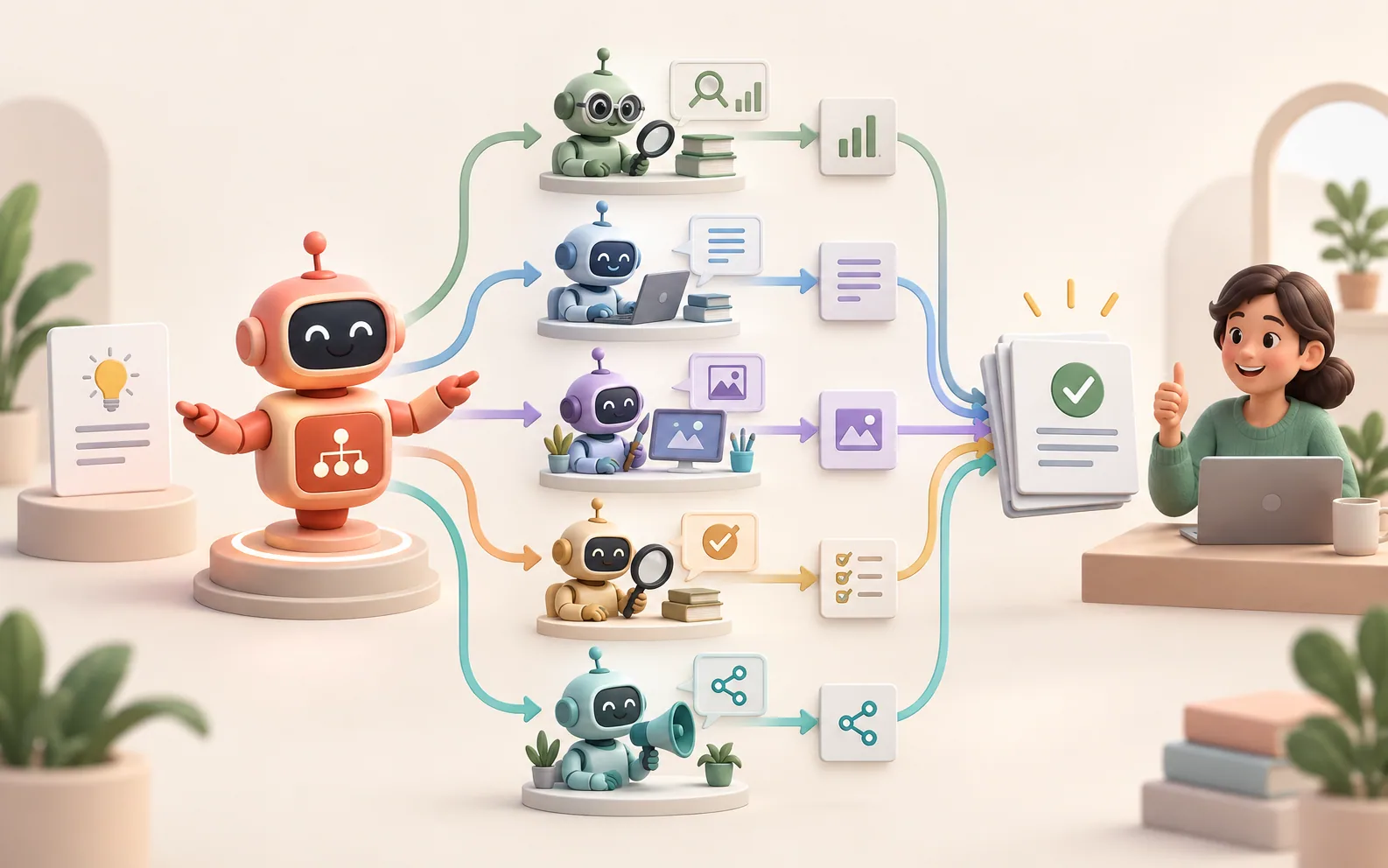
AI agent orchestration is the missing management layer
AI agent orchestration is the process of coordinating specialized agents so they can complete one shared objective instead of producing disconnected drafts. IBM defines AI agent orchestration as coordinating multiple specialized AI agents within a unified system to achieve shared objectives. That definition is useful because it puts the emphasis in the right place: orchestration is not the agent itself; it is the layer that decides how agents work together.
The practical problem is simple. A writer agent, a designer agent, an SEO agent, and a QA agent can all be good at their own tasks, but someone still has to read the brief, route the work, carry context between handoffs, and decide whether the final package is coherent. Orchestration is what turns separate AI abilities into one accountable workflow.
What the orchestrator actually controls
Swipe to explore the diagram
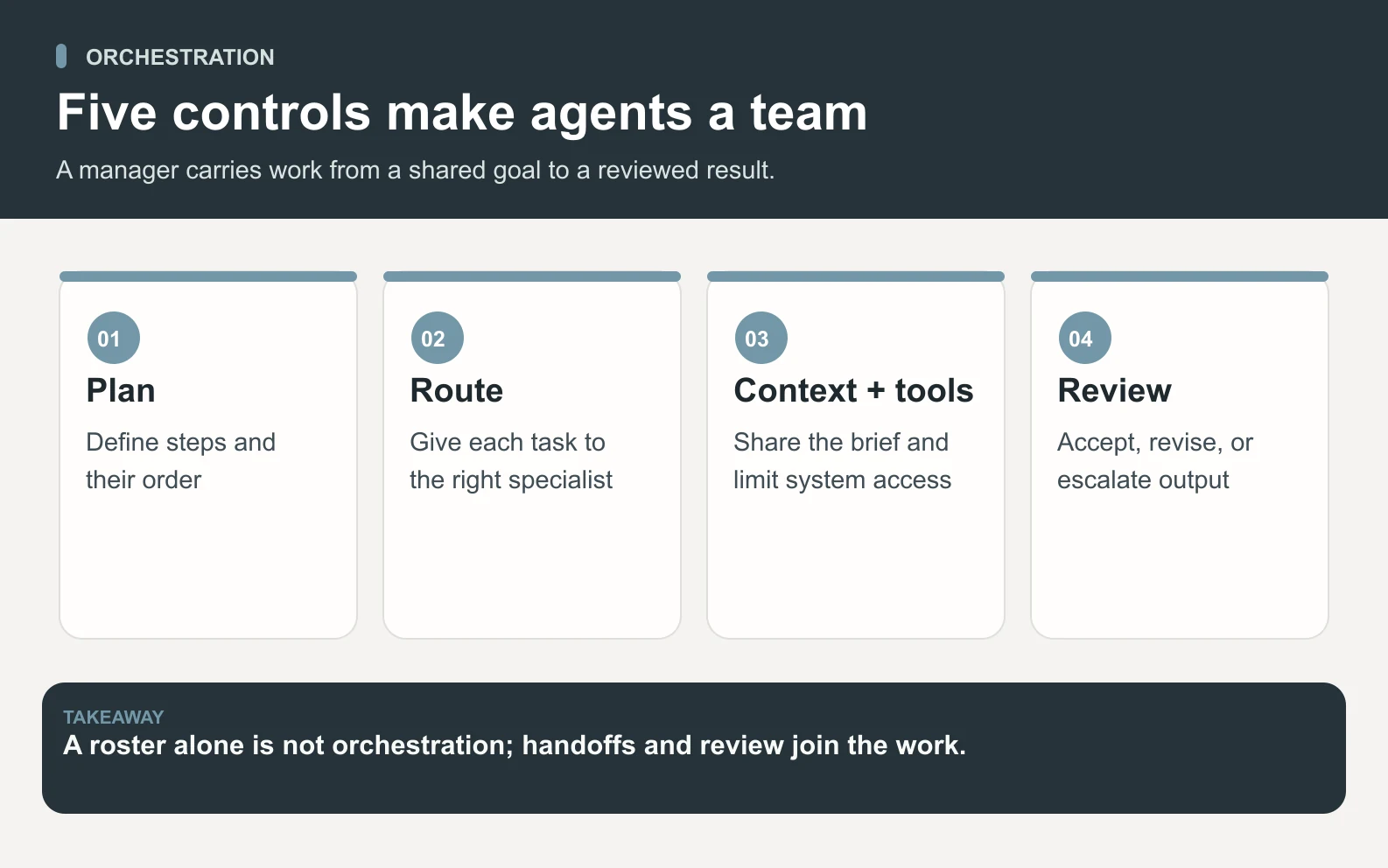
An orchestrator controls five things: plan, routing, context, tools, and review. If one of those is missing, the system may still run, but it will feel like the user is managing the agents manually.
Scroll horizontally to view all columns.
| Control | What it decides | Why it matters |
|---|---|---|
| Plan | Which steps exist and in what order | Prevents agents from rushing into disconnected work |
| Routing | Which specialist receives each task | Keeps work with the agent best suited to it |
| Context | What brief, files, brand rules, and prior outputs travel with the task | Reduces drift between handoffs |
| Tools | Which APIs, documents, apps, or searches an agent can use | Keeps access purposeful and auditable |
| Review | Whether output passes, needs revision, or should escalate | Turns draft generation into delivery |
Amazon Bedrock's multi-agent documentation describes a similar pattern: a supervisor agent plans, routes relevant requests to collaborator agents, and uses each collaborator's role and responsibilities to solve complex tasks. The labels vary by platform, but the shape is consistent. A supervisor or manager coordinates specialists, then assembles and checks the result.
The difference between many agents and orchestrated agents
Many agents are not automatically a team. A true orchestrated system has shared state, explicit roles, and a handoff rule; a loose collection of agents has none of those things unless the user supplies them manually.
This is why some AI stacks feel powerful in demos but fragile in production. The demo shows several agents doing impressive single steps. The real workflow asks: who noticed that the design changed the headline, the SEO agent optimized the old title, and the writer used a product claim the company cannot prove? Without orchestration, that mismatch lands on the founder's desk.
The simple test
If the user has to copy context between agents and judge every handoff, the system is not orchestrated yet — it is just busy.
Four orchestration patterns you will see in real systems
Swipe to explore the diagram
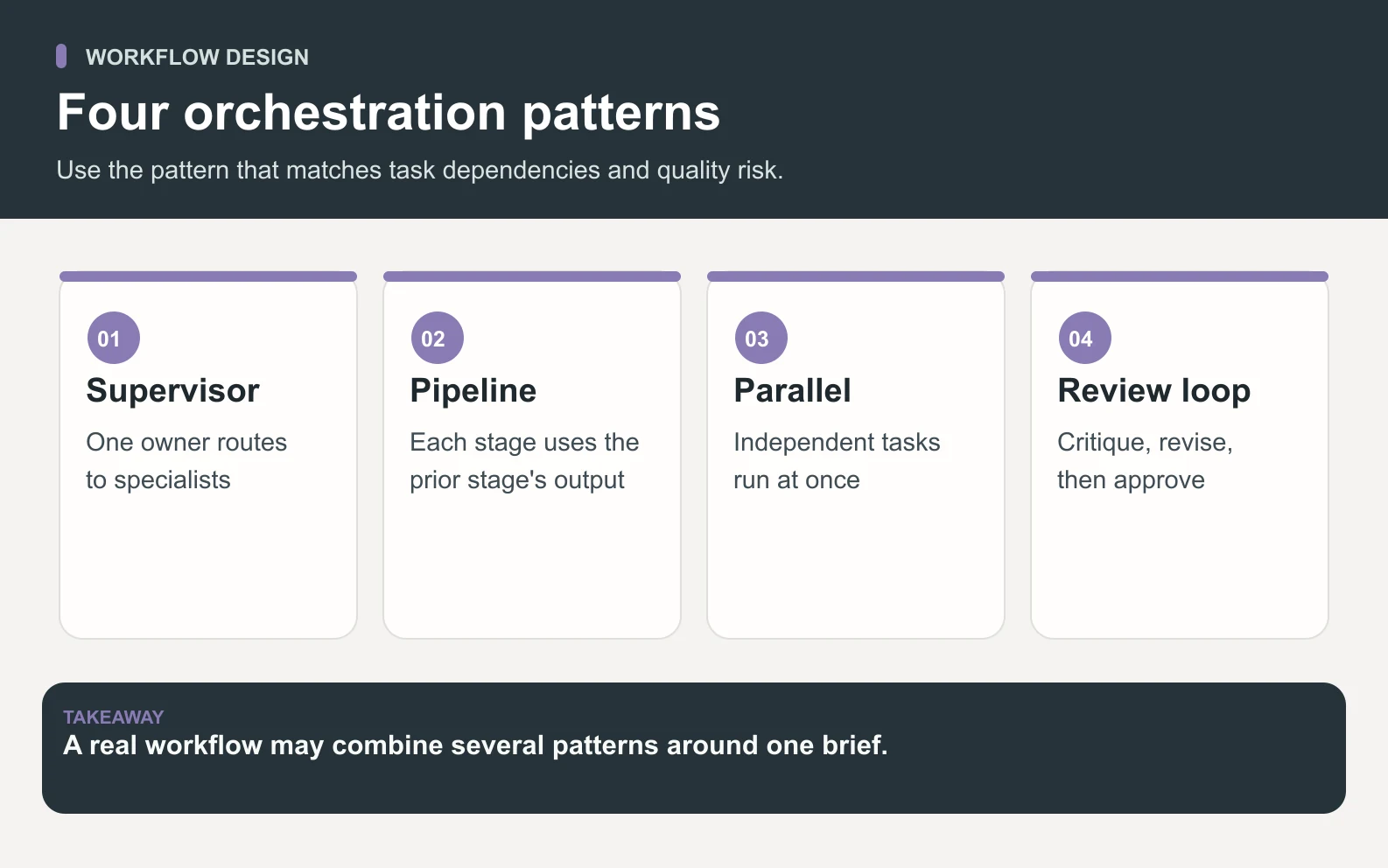
Most AI agent orchestration uses four patterns, often mixed inside one workflow. The right pattern depends on whether tasks depend on each other, can happen in parallel, or need critique before delivery.
1. Supervisor and specialists
A supervisor reads the goal and assigns pieces to specialists. This is the clearest fit for business work because it mirrors how a human project manager delegates: one owner of the brief, several owners of the craft.
2. Sequential pipeline
A sequential pipeline sends one agent's output to the next. Research feeds writing, writing feeds editing, editing feeds publishing. This works when each step depends on the last one and the handoff needs structure.
3. Parallel fan-out
Parallel fan-out splits independent work across several agents at once. It is useful when speed matters and the pieces do not block each other, such as copy, design, SEO checks, and social snippets for the same launch.
4. Review loop
A review loop sends output to a critic or project manager before it reaches the user. The reviewer can approve it, return it with notes, or escalate it. This is the pattern that turns a multi-agent workflow from productive into trustworthy.
Context is where orchestration usually breaks

Context is the hardest part of orchestration because every handoff can lose a small piece of meaning. The writer may know the audience but not the product limit. The designer may know the headline but not the SEO keyword. The QA reviewer may see the final page but not the original brief. Small context gaps become visible quality problems.
Good orchestration therefore treats context as a first-class object. The system carries the brief, constraints, source links, brand voice, prior decisions, and acceptance criteria alongside each task. The more agents you add, the more important shared context becomes. Otherwise the workflow turns into a polished version of telephone.
Tool access needs standards, not improvisation

Tool access is another orchestration job: agents need the right systems at the right time, but not every agent should access every system by default. The Model Context Protocol documentation describes MCP as an open standard for connecting AI applications to data sources, tools, and workflows. That matters because orchestration does not stop at prompt routing; it also decides which external systems an agent can safely use.
A practical setup separates permissions by role. A research agent may search and read documents. A content agent may draft in the workspace. A project manager may request approval before anything external is sent. The point is not to slow the system down; it is to keep actions traceable and reversible where they should be.
A worked example: one launch brief across five agents
Imagine a founder briefs: Launch the new analytics feature next week. An orchestrated system turns that into a small operating plan instead of one long chat response.
Scroll horizontally to view all columns.
| Step | Owner | Estimated work |
|---|---|---|
| Plan brief and acceptance criteria | Hydrogen | 10 minutes |
| Draft announcement and email | Nitrogen | 35 minutes |
| Design hero graphic and layout notes | Aluminum | 30 minutes |
| Check SEO and answer-engine framing | Neon | 25 minutes |
| Prepare social rollout | Cobalt | 25 minutes |
| Review package and send revisions | Hydrogen | 15 minutes |
Run in a serial queue, the four specialist tasks would take roughly 35 + 30 + 25 + 25 = 115 minutes before review. Run in parallel, the wall-clock time is closer to the longest specialist task, about 35 minutes, plus 10 minutes of planning and 15 minutes of review: about 60 minutes total. The math is illustrative, but the operating point is real: orchestration saves time only when it can split work without losing context.
How Space Office uses orchestration
Space Office uses orchestration as the product, not as a hidden technical detail. Space Office is a managed team of 24 AI specialists coordinated by Hydrogen, an AI project manager that reviews every output before delivery. Hydrogen reads the brief, chooses the right specialist or specialists, keeps context attached to the work, and checks the final output before it reaches the user.
That is different from selling a folder of agents and leaving the founder to manage them. The useful part is not merely that Nitrogen can write, Aluminum can design, Neon can check SEO, or Cobalt can plan social. The useful part is that Hydrogen coordinates them as one system and catches weak work before delivery. Hydrogen checks outputs against the brief and returns issues to the specialist for revision. You still review and approve the final work.
When orchestration is worth paying for
AI agent orchestration is worth paying for when the work crosses skills, has handoffs, or needs review before anyone should use it. A single-answer task does not need a managed system. A launch, research project, content pipeline, sales sequence, or support workflow often does.
The cost logic is simple. Space Office starts at $60/month or $600/year, with $25/month per added specialist, bring-your-own AI key, and zero markup on model usage. If the orchestrated workflow saves even 2 founder hours a month, the subscription can be easy to justify; if it only replaces an occasional one-line prompt, it is probably too much system for the job. The base subscription includes Hydrogen and two specialists of your choice. Additional specialists cost $25/month each. Dedicated AWS compute starts at about $30/month, and AI usage is paid separately through your own provider key with zero markup.
The buying rule
Buy orchestration when the cost of managing the AI is higher than the cost of the AI itself.
What to inspect before choosing an orchestration platform
Before choosing an orchestration platform, inspect the boring operational details. Demos show agents moving fast; production depends on what happens when a brief is ambiguous, an agent produces weak work, a source is missing, or a tool action needs approval.
- Role clarity: can the system explain why each agent was chosen?
- Context handling: does the brief travel through every handoff?
- Review: is there a named quality gate before delivery?
- Tool boundaries: can access differ by agent and task?
- Recovery: what happens when an agent misses the mark?
- Pricing: are you paying for coordination, model usage, or both?
The bottom line
AI agent orchestration is not a buzzword for using multiple bots. It is the operating system around them: planning, routing, context, tools, review, and recovery. If those pieces are present, agents can behave like a team. If they are missing, the human becomes the project manager by default.
See how Hydrogen coordinates specialist work from one brief to reviewed delivery.
How Space Office worksFrequently asked questions
What is AI agent orchestration in simple terms?
AI agent orchestration is the management layer for multiple AI agents. It reads the goal, breaks work into tasks, sends each task to the right specialist, carries context between handoffs, controls tool access, and reviews output before delivery. It turns separate agents into one coordinated workflow.
How is AI agent orchestration different from a multi-agent system?
A multi-agent system is the group of agents. Orchestration is the coordination layer that makes the group useful: planning, routing, context, tools, review, and recovery. You can have many agents without strong orchestration, but they will still need a human to manage handoffs and judge quality.
Why does AI agent orchestration matter for small teams?
Small teams do not usually lack tools; they lack management bandwidth. Orchestration lets one brief move across writing, design, SEO, research, or support without the founder copying context between agents. It matters when the saved coordination time is more valuable than another standalone AI subscription.
How much does orchestrated AI agent work cost in Space Office?
Space Office is flat $60/month or $600/year, with $25/month per added specialist. You bring your own AI provider key and pay the provider directly with zero markup. The subscription buys coordination, specialist access, and Hydrogen's review layer rather than resold model usage. Dedicated AWS compute starts at about $30/month, and AI usage is paid separately through your own provider key with zero markup.
What makes Hydrogen an AI orchestrator?
Hydrogen reads the brief, decides which Space Office specialists should work on it, keeps context attached, and reviews every output before delivery. That is orchestration: assignment plus quality control. Hydrogen checks outputs against the brief and returns issues to the specialist for revision. You still review and approve the final work.
When should I not use AI agent orchestration?
Do not use orchestration for a one-line question, a single quick draft, or work where you already want to steer every sentence yourself. It adds the most value when a task spans several skills, needs handoffs, or should be checked before it reaches a customer, client, or public page.