Guide
AI Team for Accountants: Client Work Without Chaos
By the Space Office team · Published · Updated · 9 min read
An AI team for accountants should not replace licensed judgment, tax advice, or final client sign-off. The useful version supports the work around accounting: document requests, bookkeeping prep, reconciliation checklists, client updates, content, reporting, and workflow documentation. Space Office fits as a managed support layer when accountants want fewer scattered admin tasks without pretending software is a CPA.

Accountants need leverage, not a fake accountant
The best AI team for accountants is not an auto-CPA. It is a support layer for the repeatable work that surrounds client service: asking for missing documents, summarizing notes, preparing checklists, drafting updates, organizing workflows, and turning expertise into client-friendly explanations. The accountant keeps judgment; the AI team reduces the drag around judgment.
Space Office is a managed team of 24 live AI specialists coordinated by Hydrogen, an AI project manager that reviews every output before delivery. Still in development: Cadmium (finance).
What an AI team can safely handle for accounting firms
An AI team can safely help where the task is structured, reviewable, and not the final professional decision. Think preparation, drafting, summarizing, and workflow hygiene. The safer the output is to inspect, the better the fit.
Scroll horizontally to view all columns.
| Task | Specialist fit | Human approval needed |
|---|---|---|
| Client document requests | Nitrogen + Hydrogen | Approve wording before sending |
| Monthly close checklist prep | Hydrogen now; Cadmium when live | Accountant signs off each item |
| Client report narratives | Nitrogen + Sodium | Accountant validates the numbers |
| SEO articles for the firm | Neon + Nitrogen | Partner reviews technical claims |
| Workflow documentation | Hydrogen + Sodium | Manager confirms process accuracy |
| Light compliance document reads | Zinc when available | Professional/legal review for decisions |
For accountants, safe AI delegation starts where the output is easy to inspect and stops before professional judgment is transferred.
Where humans must stay in charge
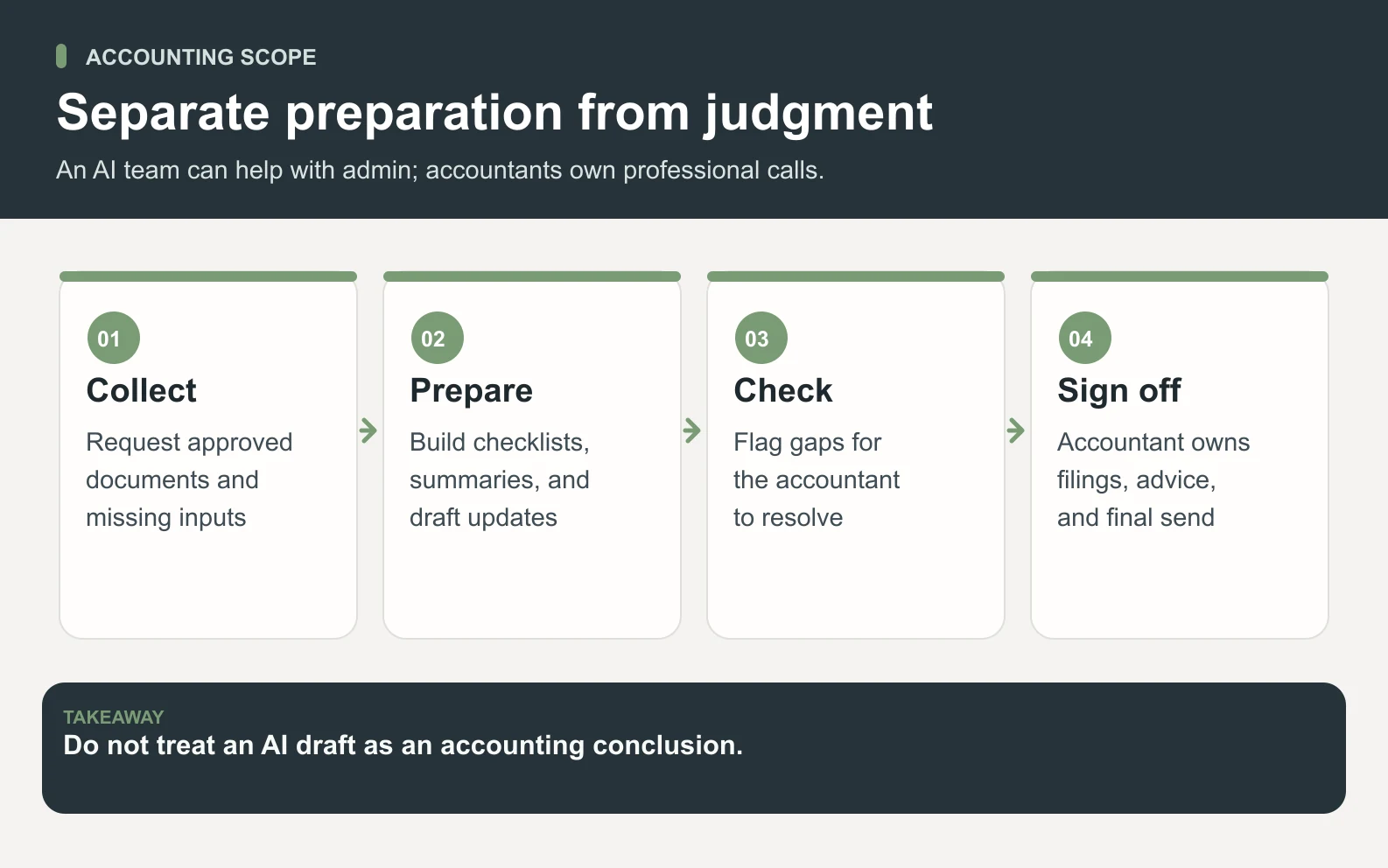
Humans must stay in charge of tax positions, audit conclusions, advisory recommendations, client sign-off, regulated filings, and anything that changes money, compliance, or legal exposure. AI can help prepare the memo, chase the missing document, or draft the explanation. It should not be the accountable professional.
Swipe to explore the diagram
- Do not let AI approve books, file returns, or give unsupervised tax advice.
- Do not use AI as the only reviewer for client financial statements.
- Do not upload sensitive client data without access rules and client-approved process.
- Do use AI for drafts, checklists, summaries, templates, and non-final analysis.
The month-end workflow is the best first use case
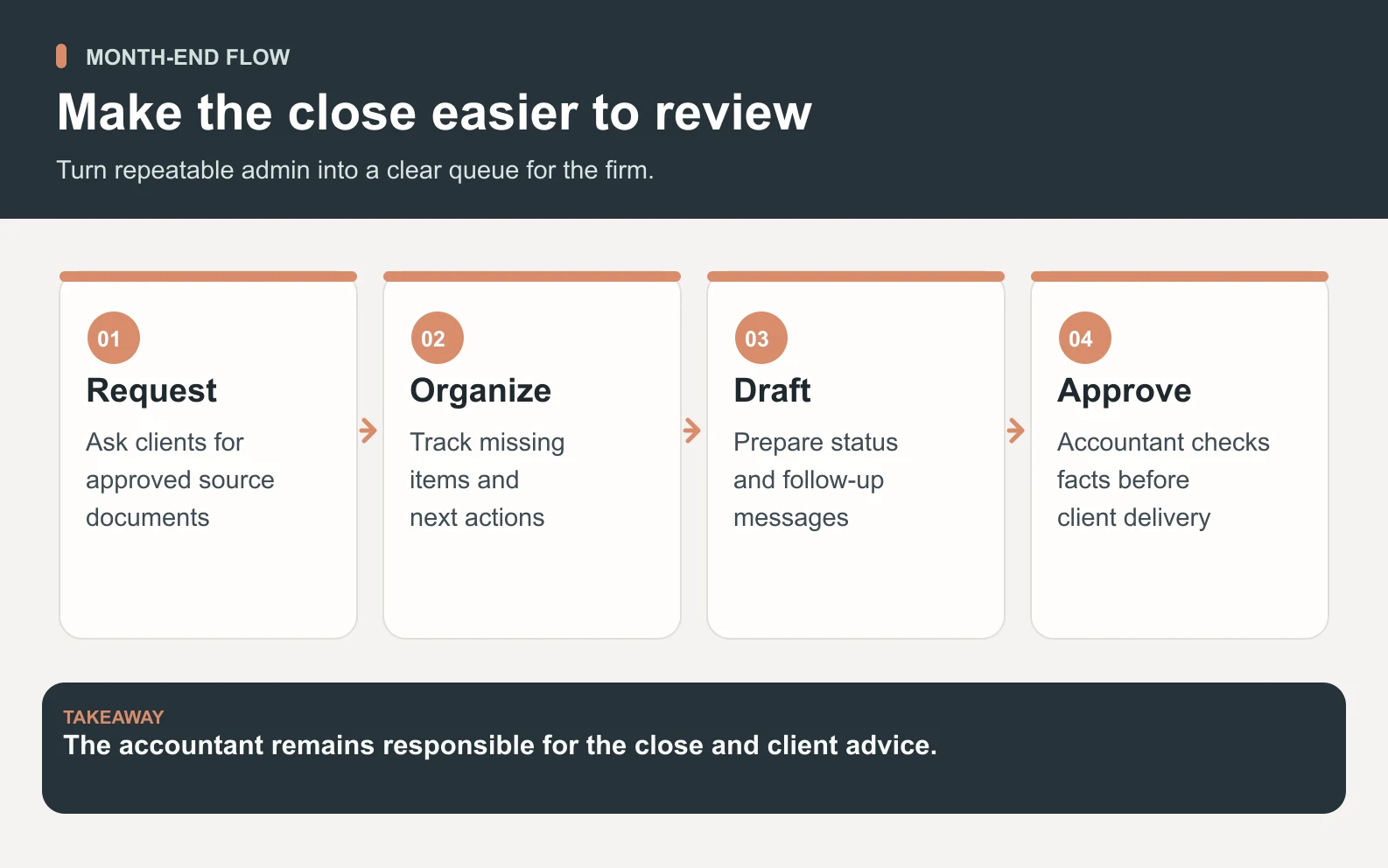
Month-end is a strong first use case because the work repeats, the steps are inspectable, and small delays create a lot of client anxiety. Hydrogen can turn the close process into a queue: what is missing, who needs a reminder, what report needs a plain-English summary, and what items need human review.
Swipe to explore the diagram
1. Intake and missing-document follow-up
Nitrogen can draft polite client reminders for bank statements, receipts, payroll files, or vendor details. Hydrogen can organize them by client and urgency. The accountant or account manager still approves the final send, but the blank-page work disappears.
2. Checklist and reconciliation prep
Hydrogen can prepare a checklist from your month-end process and flag missing steps. When Cadmium is live, the bookkeeping and finance specialist is the natural fit for categorization, reconciliation, monthly close, and cash-flow snapshots. Until then, keep claims to preparation and workflow support.
3. Client-ready summary drafts
Nitrogen can turn accountant notes into plain-English client updates. Sodium can help gather context for industry or market notes. The accountant checks the numbers, removes anything too speculative, and sends a clearer update faster.
A worked example: 18 admin hours around month-end
Imagine a small accounting practice with 12 monthly clients. Around close, the team spends 5 hours chasing documents, 4 hours drafting client updates, 3 hours preparing internal checklists, 3 hours cleaning meeting notes, and 3 hours turning recurring questions into help content. That is 18 hours of support work before the technical accounting review even starts.

Scroll horizontally to view all columns.
| Workstream | Manual effort | With AI team support |
|---|---|---|
| Document request drafts | 5 hrs | 1.5 hrs review and send |
| Client update narratives | 4 hrs | 1.5 hrs accountant edit |
| Close checklist prep | 3 hrs | 1 hr manager review |
| Meeting-note cleanup | 3 hrs | 1 hr review |
| FAQ/help article drafts | 3 hrs | 1 hr partner review |
| Total | 18 hrs | 6 hrs human review |
The arithmetic is simple: 18 manual support hours minus 6 review hours leaves roughly 12 hours recovered per month. That number is illustrative, not a universal benchmark. The important pattern is that accountants spend less time formatting, chasing, and rewriting, while keeping the review step where it belongs.
For example, a partner can paste rough notes that say: client is missing two bank statements, payroll export is late, sales tax question needs review, close likely moves from Friday to Monday. Hydrogen can split that into a task list, Nitrogen can draft the client note, and Sodium can organize the context for the reviewer. The accountant then checks the facts and sends a clear message instead of rebuilding the explanation from scratch. That is the right kind of leverage because the firm still owns the facts, the promise, the deadline, and the client relationship. It saves time without moving accountability out of the practice.
Client communication is a high-leverage lane
Client communication is one of the safest places to start because drafts are easy to review and the benefit is immediate. Many firms already know what they want to say; they just do not have time to say it clearly every week. Nitrogen can turn rough notes into client emails, status updates, onboarding copy, and plain-English explanations.

The rule is that an accountant reviews anything technical before it leaves. AI can make the first draft less painful. It should not create advice from thin air or send client-facing messages without approval.
Marketing support matters more than most firms admit
Accounting firms win trust before prospects book a call. Helpful articles, service pages, onboarding guides, and FAQ content make the firm easier to understand. Neon can plan SEO topics, Nitrogen can draft, and Hydrogen can review the output against the brief before a partner checks technical accuracy.
This is where an AI team can help even before bookkeeping-specific specialists are live. A firm can publish articles on cash-flow basics, month-end readiness, bookkeeping cleanup, or founder finance habits without pulling billable staff into every blank page.
How pricing works for an accounting practice
Space Office costs $60/month or $600/year. Added specialists are $25/month each. You bring your own AI key and pay the model provider directly with zero markup. Dedicated AWS compute starts at about $30/month, and AI usage is paid separately through your own provider key with zero markup.
Scroll horizontally to view all columns.
| Setup | Monthly platform cost | Best fit |
|---|---|---|
| Base Space Office team | $60/mo | Client communication, marketing, research, workflow docs |
| Base + 2 extra specialists | $110/mo | Heavier content, operations, reporting support |
| Base + 4 extra specialists | $160/mo | Firm-wide support across marketing, admin, research, and finance prep |
| AI usage | Direct provider cost | Paid through your own key with zero markup |
What to delegate in the first 30 days
- 1Create a reusable client document-request template library.
- 2Turn one month-end process into a reviewed checklist.
- 3Draft client update emails for three common situations: missing documents, close complete, and question follow-up.
- 4Publish one plain-English help article that answers a recurring client question.
- 5Build a simple weekly status report for internal work-in-progress.
Those tasks are useful because they are specific, inspectable, and low drama. They produce assets the firm can keep using, and they teach Hydrogen how the practice communicates before any sensitive finance workflow is delegated.
A good first month also creates reusable assets. The best outcome is not one clever AI response; it is a document-request template, a month-end checklist, a reporting note format, and a client FAQ that the firm can reuse. That makes the next close easier and gives reviewers a standard to check against. If the AI team cannot turn recurring work into reusable process, it is only making drafts. The goal is calmer operations, not more things to supervise.
Risks and guardrails for accounting use
The biggest risks are over-delegation, unclear access, and technical drift. Set rules before the first task: what data may be shared, who approves client-facing content, which systems are off-limits, and which tasks require partner review. AI support should make the firm calmer, not create a hidden second process no one supervises.
- Use least-privilege access for any connected tool.
- Keep client approvals and professional sign-off human-owned.
- Mark drafts clearly so nobody mistakes them for final advice.
- Review outputs for accuracy, tone, confidentiality, and scope.
- Document what worked so repeatable workflows improve each month.
When not to use an AI team for accounting
Do not use an AI team when the process itself is unclear, when no qualified person can review the output, or when the task requires licensed professional judgment. If your firm cannot say who approves a client message, who owns a filing, or what data can be shared, pause and define the workflow first.
Meet the Space Office specialists that can support client communication, research, workflows, reporting, and finance prep.
Meet the teamThe practical takeaway
An AI team for accountants works best as a reviewed support layer. It helps with the repeatable work that steals attention from client judgment: reminders, summaries, checklists, content, reports, and workflow documentation. Keep the professional decisions human, and AI becomes leverage instead of liability.
Frequently asked questions
What is an AI team for accountants?
An AI team for accountants is a managed support layer for document requests, checklist prep, client updates, reporting drafts, content, workflow documentation, and other reviewable tasks. With Space Office, Hydrogen coordinates specialists and reviews outputs before delivery, while accountants keep professional judgment and final sign-off.
How much does an AI team for accountants cost?
Space Office costs $60/month or $600/year, with added specialists at $25/month each. You bring your own AI key and pay the provider directly with zero markup. For accounting firms, the value is usually recovered admin, communication, and workflow time, not replacing licensed staff. Dedicated AWS compute starts at about $30/month, and AI usage is paid separately through your own provider key with zero markup.
Can AI replace a bookkeeper or accountant?
No, not responsibly. AI can prepare drafts, checklists, summaries, and reminders, but licensed judgment, client advice, filings, review, and accountability should stay with qualified humans. Space Office should support accounting work rather than pretend to be the professional of record.
Which Space Office specialists help accounting firms?
Hydrogen coordinates and reviews work. Available now: Neon (SEO), Nitrogen (content and copy), Sodium (market research). Still in development: Cadmium (finance). Tax preparation and regulated sign-off remain with a qualified professional.
What accounting tasks are safest to delegate first?
Start with tasks that are structured and easy to review: client document requests, month-end checklists, meeting-note cleanup, FAQ drafts, internal workflow docs, and plain-English client updates. Avoid unsupervised tax advice, filing decisions, financial statement sign-off, or anything that changes money without human approval.
How should accounting firms protect client data when using AI?
Use least-privilege access, share only what the task needs, keep sensitive systems off-limits unless approved, and require human review before client-facing output. The firm should define data rules, approval rules, and escalation rules before connecting tools or uploading client materials.