Guide
AI Overviews SEO: Check Eligibility, Improve a Page, and Measure Honestly
Use AI Overviews SEO to check one page's Google Search eligibility, improve its evidence, and keep observed answer links separate from traffic reports.
By the Space Office team · Published · Updated · 16 min read
AI Overviews SEO is work that helps a page meet Google Search requirements and provide useful evidence for a reader, without promising inclusion in an AI Overview. Google says a supporting page must be indexed and eligible for a search snippet; there is no extra AI-specific technical requirement. In Space Office, Neon can audit the chosen page, Nitrogen can draft improvements, and Hydrogen can review the handoff. The owner supplies approved data, verifies claims, and decides whether to publish. Measure page performance and observed answer links separately.

Key takeaways
- Check the actual canonical page, its index status, visible content, and snippet eligibility before changing the copy.
- Choose one reader question the page can answer with current evidence and useful detail.
- Use an approved audit, draft, and review process; specialist roles do not imply automatic account access or publication.
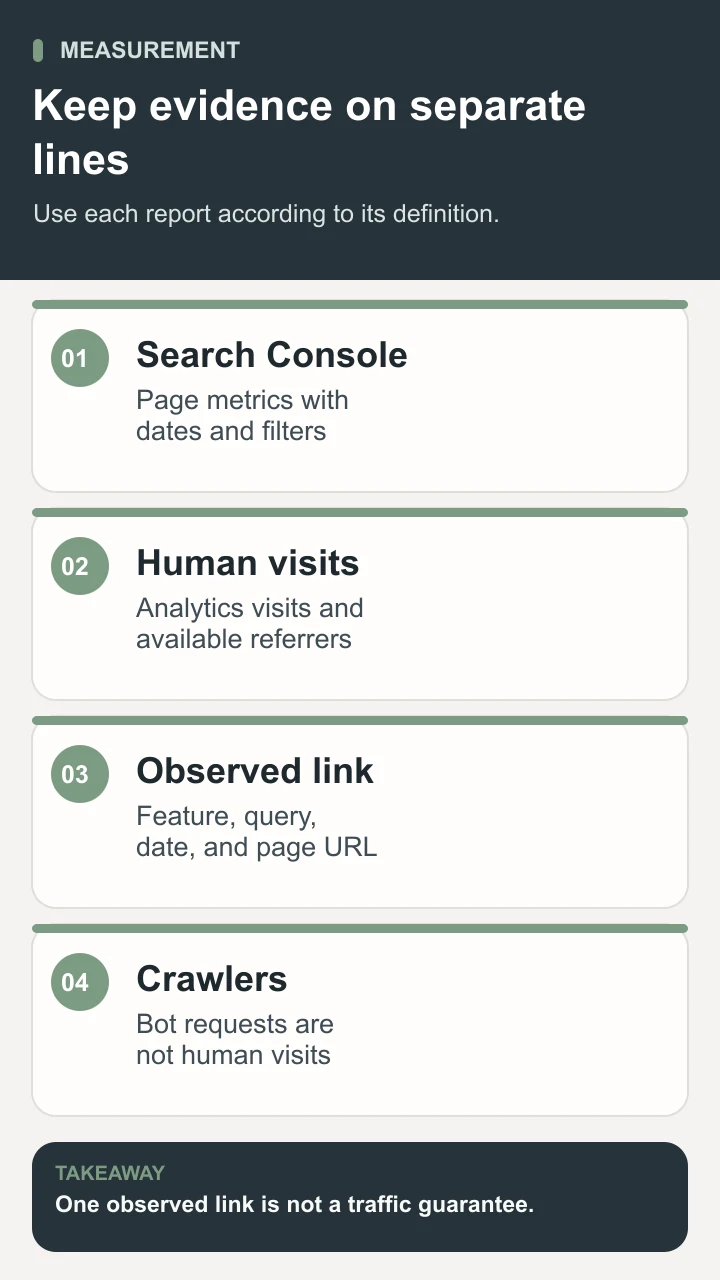
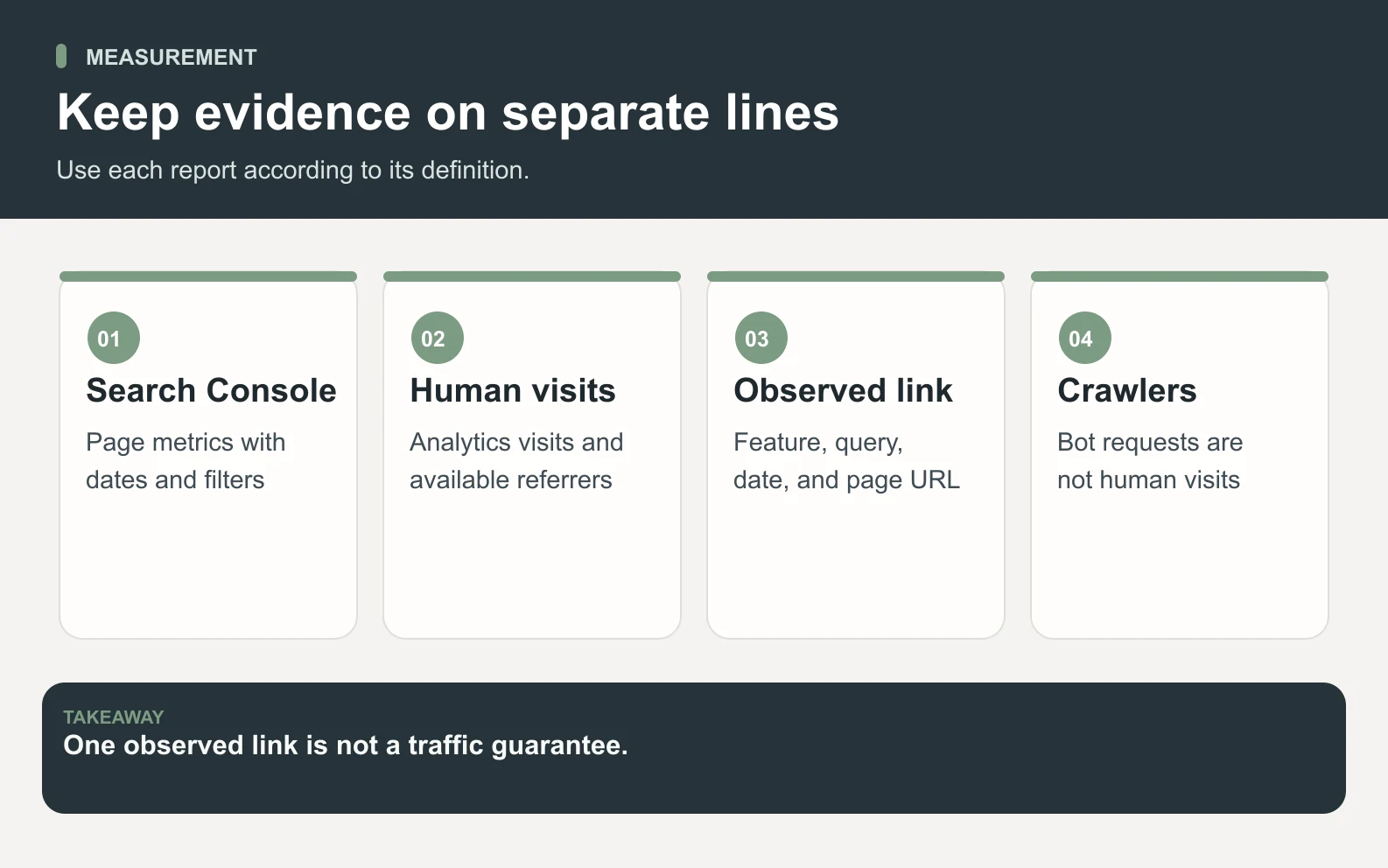
- Keep Search Console results, analytics visits, observed answer links, and crawler requests on separate lines.
- Do not treat a schema property, a special text file, or a single citation screenshot as a guarantee of inclusion.
What AI Overviews SEO can and cannot control
Google's AI feature guidance says ordinary Search fundamentals apply to AI Overviews. Meeting the requirements does not guarantee that Google will crawl, index, or serve the content. Treat those requirements as a starting check, then focus on the reader problem your page can solve. A page owner controls the published information and its access settings; the owner does not control which pages an answer selects.
This guide focuses on Google's AI Overviews: checking one page, improving its evidence, and evaluating the result. It does not assume that AI Mode, a conventional result, and an AI Overview are interchangeable observations. If you record an appearance, name the feature you actually saw. Our generative engine optimization guide covers broader source discoverability across answer platforms, and our answer engine optimization guide explains how to organize a page around a supported answer.
Start with an editorial objective that remains useful if the page never appears in an Overview. A buyer might need a comparison with documented conditions, a founder might need a practical review process, or a customer might need an explanation of what a service includes. Write down that need before the audit. It becomes the standard for the revised page and prevents a common mistake: adding a short definition or an impressive diagram to content that still fails to explain the actual task.
Check eligibility on the actual page
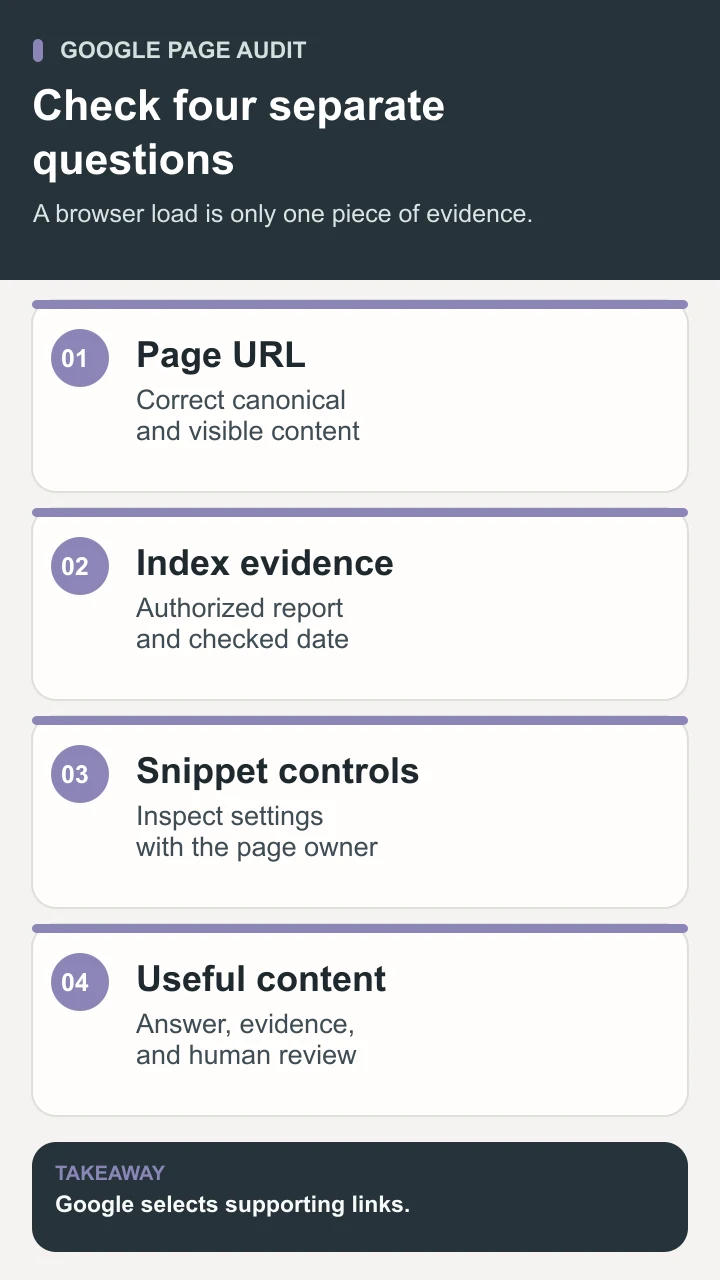
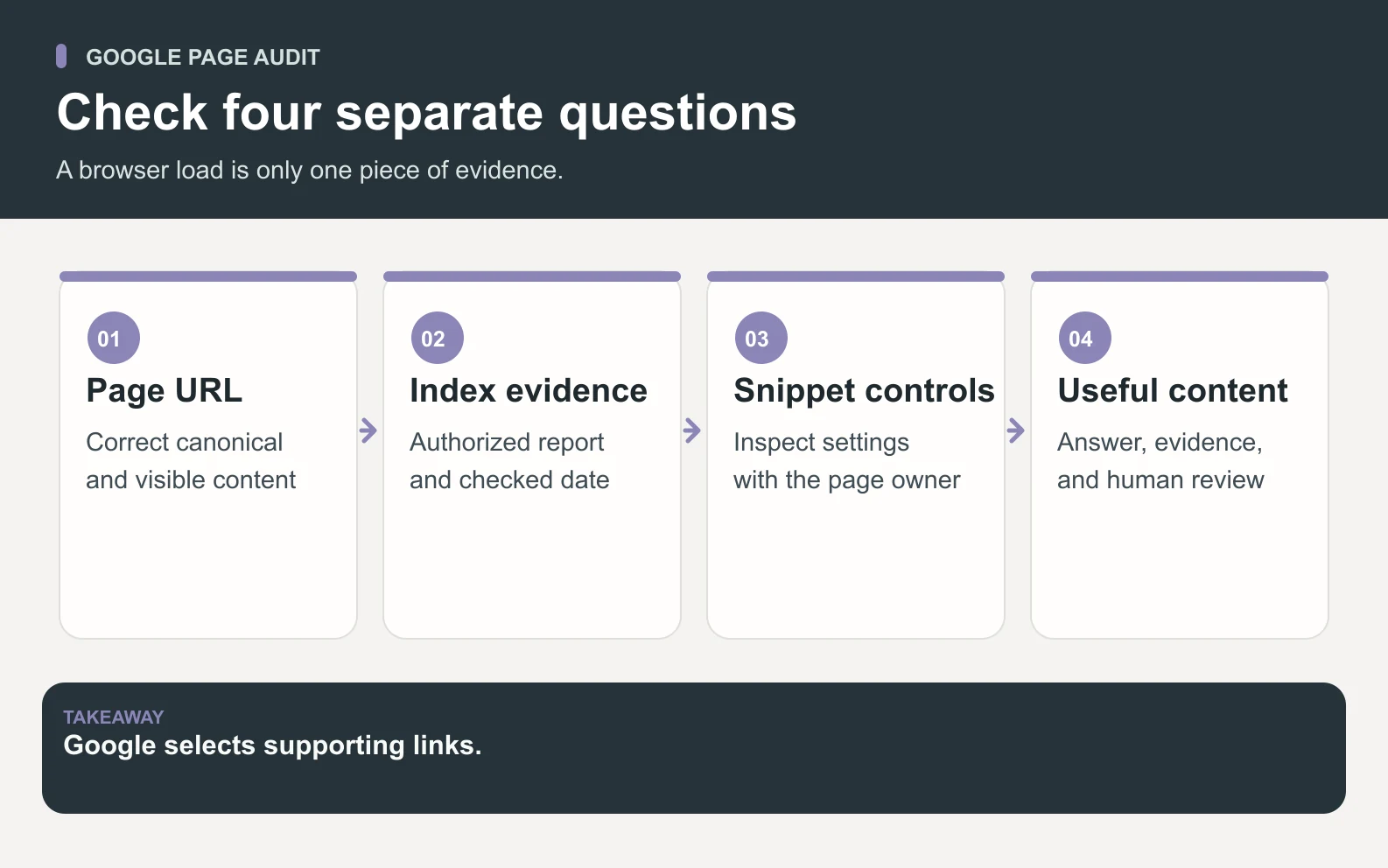
Use the page's intended canonical URL as the audit unit. Open it without signing in and verify that the important explanation is visible. Then use authorized Search Console access or an owner-supplied export to investigate index status. Google's Search Console introduction describes URL Inspection and performance reporting as ways to understand a site's presence in Search. If you do not have that access, record index status as unverified instead of treating a successful browser load as proof of indexing.
Review the page's title, canonical declaration, indexing instructions, and any content or snippet controls with the person responsible for the website. Google documents snippet controls, including settings that limit or suppress displayed snippets. Do not change a deliberate restriction simply because you want more visibility. First ask what the setting protects or expresses. A draft audit can recommend a review; the owner decides whether the existing policy should change.
- 1Confirm the intended URL returns the correct page and a coherent explanation without requiring a sign-in or a click to reveal the key answer.
- 2Check the canonical and relevant crawl, indexing, and snippet settings. Record the actual values and any uncertainty.
- 3Use authorized URL Inspection information to check index status and any reported issue. Keep the report date with the finding.
- 4Follow the page's internal links and verify that the sources, relevant product page, and useful next step are accessible.
- 5Separate technical findings from writing recommendations so the owner can review each proposed change on its merits.
For a Space Office task, Neon can prepare that audit from the page and approved evidence. The brief should state which checks were observed directly and which need account access or a developer. Hydrogen can coordinate missing inputs, but coordination does not turn an unavailable report into a verified result. If a crawler can fetch the page but the owner has not provided index evidence, the audit should retain both statements. Honest uncertainty is more useful than a green status that combines several different checks.

Choose a question and improve its evidence
Use a real question from page-filtered search queries, customer conversations, or a documented support need. Check whether an existing page already answers it well. A current price belongs on the pricing page; an explanation of a review method can belong in a guide. The page should make one clear promise, then answer the conditions and follow-up questions that promise creates. Avoid expanding it into every loosely related topic just because an AI answer might cover several ideas.
Write a direct answer near the top, followed by the information needed to use it. If the question asks how a process works, name the inputs, steps, output, and approval boundary. If it asks how two options differ, show the decision criteria and evidence. If a claim depends on a current product feature, point to the authoritative product page and check it before publication. Google's people-first content guidance is a useful reference for evaluating substance and sourcing; the practical editorial test is whether a reader can act on the explanation.
Give images a teaching job. A diagram can show the difference between index evidence and a browser load, or distinguish a draft from a publication decision. Put the essential explanation in text as well, so the image is not the only place where the method appears. Google's image guidance discusses descriptive alt text and surrounding page context. On a phone, a portrait version may be necessary for a wide process diagram to remain legible. These choices also help a human reviewer spot labels that contradict the prose.
Worked example: review a service-process explanation
Consider an illustrative founder who wants an existing service-process page to explain how an AI team prepares an SEO draft. The reader question is: what does the team need, what work can it prepare, and who approves the result? The owner supplies the current URL, approved product facts, and an authorized page/query report if available. The task is to audit and draft an improvement for review. It includes no instruction to access new accounts, submit indexing requests, or publish a page.
Neon first checks the current answer and access evidence. Nitrogen then drafts a concise explanation: the owner supplies the page and approved evidence; the relevant specialists prepare the audit and content; Hydrogen coordinates and reviews the handoff; the owner verifies facts and approves publication. The supporting material can show the input checklist, examples of acceptable evidence, and the boundary between preparing a draft and releasing it. The human reviewer confirms the statement against the current specialist roster and how-it-works page.
Scroll horizontally to view all columns.
| Draft element | Useful revision | Reviewer check |
|---|---|---|
| Opening answer | Name the inputs, preparation work, and human publication decision | Does the answer match the current service? |
| Evidence | Link the current role and process pages near capability claims | Do the linked pages support the specific statement? |
| Method | Show the page audit, draft, review, and decision sequence | Can the owner identify what is needed at each step? |
| Limits | State that account access and answer inclusion are not automatic | Has the draft added a promise the product does not make? |
| Measurement | Record the page, filters, change date, and observed result | Are search, visits, and answer-link observations separated? |
Suppose the first draft says the team automatically publishes and Google then includes the page in an answer. The reviewer should reject both unsupported steps. Replace the publication statement with the actual human decision and remove the predicted inclusion. The resulting page may sound less dramatic, but it gives the reader a more usable description of what happens. That is the value of the exercise even if Google never selects the URL.
Keep a before-and-after record for the owner. Save the original answer, the revised answer, the sources added, and any technical recommendation. If the task uncovers a site issue unrelated to the explanation, list it separately rather than silently broadening the edit. The release note should show which recommendations the owner accepted, what actually changed, and when the public page was checked. This creates a reference for later measurement and prevents the team from treating a proposal as a deployed fix.
Run a bounded Space Office audit and review
A useful brief contains the canonical URL, primary reader question, approved facts, available search evidence, and the name of the human decision maker. It should also say which actions are permitted. For an initial task, request an audit and draft rather than an open-ended instruction to improve all search visibility. Neon contributes the SEO and discovery analysis, Nitrogen contributes the copy, and Hydrogen coordinates the work and reviews specialist output. Check the current agents page before assigning a role.
Ask the team to return three artifacts. The audit lists observations, uncertainties, and proposed changes. The draft contains the visible answer and support, with source links beside factual claims. The review note explains what remains for the owner to verify. Those artifacts serve different purposes: the audit supports the decision, the draft proposes the content, and the note preserves the boundary. A person should be able to accept one recommendation while rejecting another without having to untangle a single vague score.
Before approving publication, open the staged page on a desktop and phone. Check whether the answer is visible early, tables remain usable, images load, and the conclusion gives the reader a sensible next step. Compare the rendered author, dates, canonical, and structured data with what the reader can see. Then check the actual public page after the owner releases it. A correct source module or attractive preview is not proof that the intended URL serves the approved content. Our review guide provides a broader acceptance checklist.

Measure AI Overviews SEO without inventing a result
Google's AI feature documentation explains that traffic from AI features is included in overall Search Console Web reporting. Do not label a page's entire Web click total as clicks from AI Overviews. Name the report and filters you used. If your account exposes a separate AI feature report, record its definition and available fields before comparing it with other metrics; never reconstruct an unavailable breakdown from an aggregate total.
Save the page-filtered baseline with the date range, country, device, search type, and query groups. After publication, compare equivalent complete periods and inspect the actual queries. A rising impression count may reflect a different query mix rather than a better answer to the intended question. A changed CTR may reflect search presentation or new queries. Write down these observations without assigning a cause the reports cannot prove. When the sample is small, use counts and acknowledge how little evidence the window contains.
Scroll horizontally to view all columns.
| Evidence | Record | Interpretation limit |
|---|---|---|
| Search Console | Page, dates, filters, clicks, impressions, CTR, position | Aggregate page results do not identify every Overview link |
| Analytics | Human visits, available referrers, relevant next actions | Attribution can be missing; a visit is not an answer impression |
| Observed answer link | Query, feature, date, location context, linked URL | One observation is not repeatable inclusion for every reader |
| Crawler activity | Bot type, request count, date window | A request is not a human visit or proof of a citation |
If you manually see a supporting link, save the observation with its context. Record whether the result was an AI Overview, AI Mode, or a conventional listing, and confirm the linked URL. The observation can inform the next review, but it should not become a claim that the page now appears for all users. Keep it separate from referral visits and crawler requests. The broader GEO measurement guide explains why those categories need different denominators.
Mistakes that make the audit less useful
A special file is not a shortcut around poor content or unavailable index evidence. Google states that there is no special AI schema or additional AI text file required for its AI features. Maintain machine-readable outputs when they serve your site, but do not present them as an inclusion switch. The visible answer, supporting detail, and accessible page still need their own review.
- Treating a fetched URL as proof of indexing, or an indexed URL as proof of an AI Overview appearance.
- Changing titles, copy, navigation, and access settings at once, then attributing every metric movement to one paragraph.
- Adding repeated question variants while leaving the real answer unsupported or hard to find.
- Calling bot requests visitors, or assigning an aggregate search total to a feature the report does not isolate.
- Publishing capability claims that the current product facts, source pages, or human reviewer cannot support.
Also avoid maintaining two public pages with the same primary promise when one clear page could serve the reader. Use a specialist guide for the Google-specific audit method, a broader guide for source discoverability, and the current service pages for product capabilities. Link to the next relevant explanation when the reader's question changes. This makes the information easier to maintain and keeps the owner from updating one answer while an almost identical answer elsewhere becomes stale.
Conclusion: make AI Overviews SEO a checkable page task
AI Overviews SEO works best as a concrete audit and improvement task: check the intended page, establish what the evidence says about eligibility, answer one real reader question, and record the result honestly. Space Office can help through Neon, Nitrogen, and Hydrogen while the human owner verifies facts and controls publication. Keep the task useful even without an Overview link. A clearer, better-supported page and a reliable change record give the next reviewer something real to work with.
Sources and review notes
Reviewed against the linked primary sources on the checked dates. Search features and citations are selected by their respective platforms; no placement is guaranteed.
- Google Search Central: AI features and your website — checked
- Google Search Central: Creating helpful, reliable, people-first content — checked
- Google Search Central: Control your snippets in search results — checked
- Google Search Central: How to use Search Console — checked
- Google Search Central: Google image SEO best practices — checked
Frequently asked questions
What is AI Overviews SEO?
AI Overviews SEO is work that helps a page meet Google Search requirements and answer a reader's question with useful evidence. It includes checking the actual page and improving its visible explanation. Google selects supporting links, so the work cannot guarantee inclusion in an AI Overview.
Does Google require separate AI Overview markup?
No. Google says there is no special AI schema or extra AI text file required for its AI features. Use structured data when it accurately describes the visible content, and check ordinary access and search eligibility instead of treating a markup property as an inclusion switch.
Can I count all Search Console clicks as AI Overview clicks?
No. Name the report and filters you actually used. Aggregate Web results include multiple Search experiences and should not be relabeled as an AI Overview total. If a more specific report is available, record its definitions and limitations before making a comparison.
How is this different from a general GEO guide?
This task focuses on a page's Google Search eligibility, an improvement for its reader, and careful interpretation of Google-specific evidence. A general generative engine optimization guide considers source discoverability across multiple answer platforms. The methods overlap, but the platform, checks, and observations need to be named precisely.
Can Space Office guarantee a supporting link in AI Overviews?
No. Space Office can help prepare an audit, draft, and review record using approved inputs and the relevant specialists. Hydrogen coordinates and reviews the handoff, and a human owner checks facts and approves publication. Google decides which supporting links to show.