Comparison
Managed AI Team vs DIY Agents: Decision Framework
By the Space Office team · Published · Updated · 10 min read
Choose DIY agents or automation builders when you need to own the workflow logic. Choose a managed AI team when you need reviewed specialist output without becoming the dispatcher, evaluator, and maintainer. Many lean teams should mix both: keep deterministic automations in a builder, and put open-ended deliverables on a managed roster.

The market collapses three different jobs into one phrase—“AI agents.” One job is wiring apps so a trigger always does the same thing. Another is building custom agent logic as product infrastructure. A third is getting marketing, research, design, ops, or support work done with quality review. Confusing those jobs leads to the wrong buy: a canvas when you needed a team, or a team when you needed a reliable webhook.
Space Office is the managed-team path: Hydrogen coordinates specialists, reviews output before delivery, and you keep a human approval gate on anything that ships. The subscription is $60/month or $600/year for Hydrogen plus two specialists; add more specialists at $25/month or $250/year each. There are 25 live agents total—Hydrogen plus 24 specialists. Compute and model usage are separate. This guide is a decision framework, not a claim that every DIY stack is obsolete.
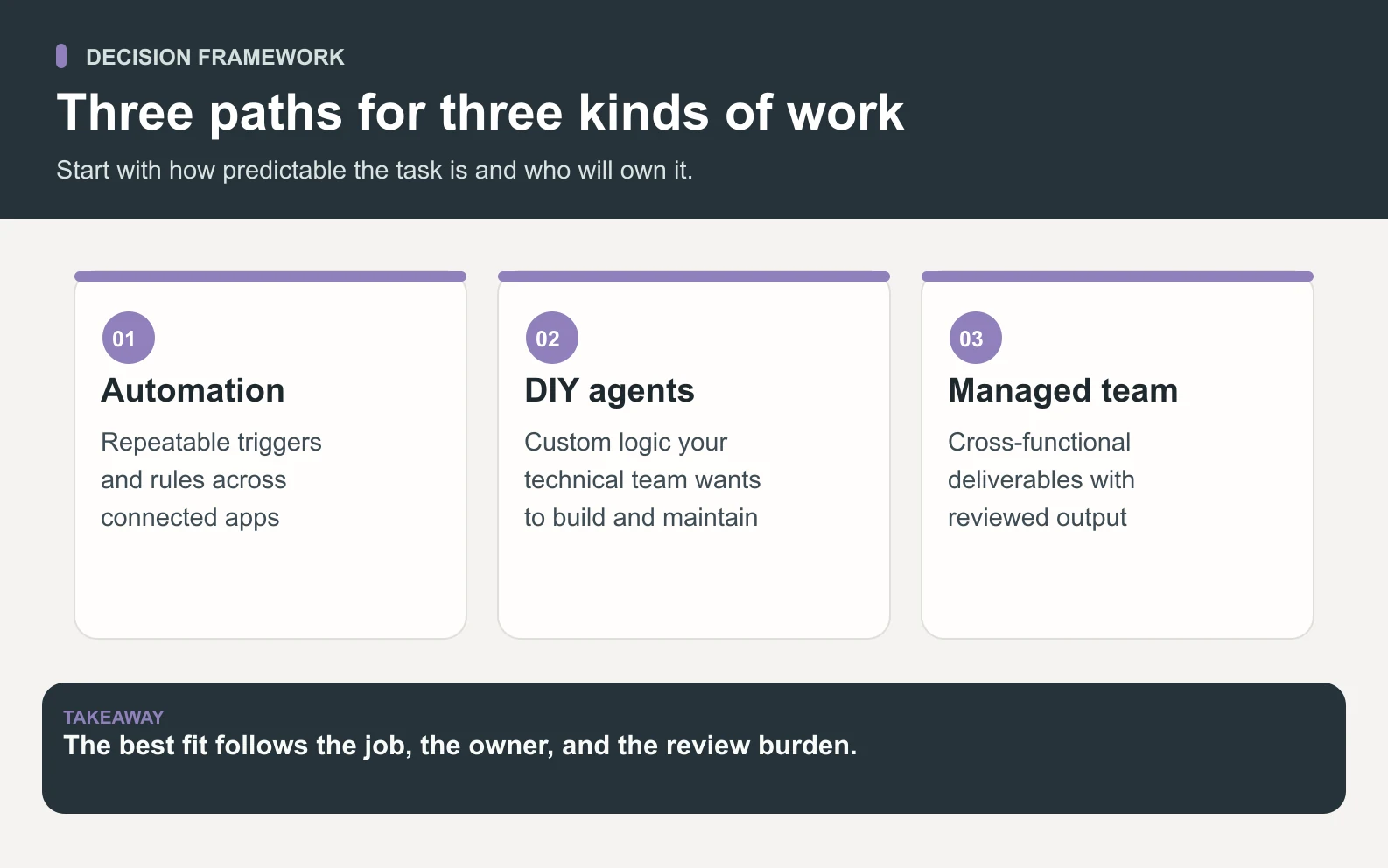
Three paths, not two
Swipe to explore the diagram
- 1Automation builders (Make, Zapier, n8n, and similar canvases): best for deterministic, event-driven workflows you can test and version.
- 2DIY agent frameworks / builders: best when agent behavior is part of your product, data boundary, or internal platform.
- 3Managed AI team (Space Office): best when you need reviewed deliverables across roles and do not want to own orchestration day to day.
Start with the job
If the success criterion is “this webhook always updates the CRM,” buy or build automation. If the success criterion is “this launch pack is coherent and reviewable,” prefer a managed team. If the agent *is* the product, DIY.
Decision table: setup, review, pricing, fit
Scroll horizontally to view all columns.
| Category | DIY agents / frameworks | Automation builders | Managed AI team (Space Office) |
|---|---|---|---|
| Setup time | Days to months: design, tools, evals, deploy | Hours to weeks: map triggers and steps | Start from a brief; roster selected at signup |
| Review / QA | You design prompts, tests, and human checks | Deterministic checks; limited open-ended QA | Hydrogen reviews specialist output; human approves finals |
| Pricing shape | Engineering time + hosting + model usage | Task/ops credits or self-hosted infra | $60/mo base (Hydrogen + 2 specialists); +$25/mo per extra specialist; compute and BYO model usage separate |
| When to choose | Agent logic is product/moat or must stay in-house | Reliable app-to-app workflows with clear rules | Cross-functional deliverables with coordination and review |
When DIY agents or automation builders win

- The workflow must be deterministic and auditable (billing events, CRM sync, inventory).
- You need deep integration with private systems that a managed roster should not touch yet.
- Agent behavior is a customer-facing product feature you must own end to end.
- Your team already has capacity to maintain prompts, evals, secrets, and monitoring.
In those cases, keep Space Office out of the critical path—or use it only for surrounding work (docs, launch copy, research synthesis) while the core automation stays in your builder or codebase. See also AI agents vs automation tools and AI agents vs building your own.
When a managed AI team wins

- You need finished packets across roles (content + design + SEO + research) from one brief.
- You lack bandwidth to be the forever dispatcher and QA lead for every small task.
- You want a clear subscription shape before you invent an internal agent platform.
- You still keep a human owner for final approval—especially client-facing or regulated work.
Space Office fits that pattern: pick specialists on /agents, understand the flow on /how-it-works, and calculate the live offer on /pricing. For competitor-shaped questions, start at the AI tool alternatives hub. For industry-shaped questions, start at AI team for businesses.
A practical hybrid
Swipe to explore the diagram
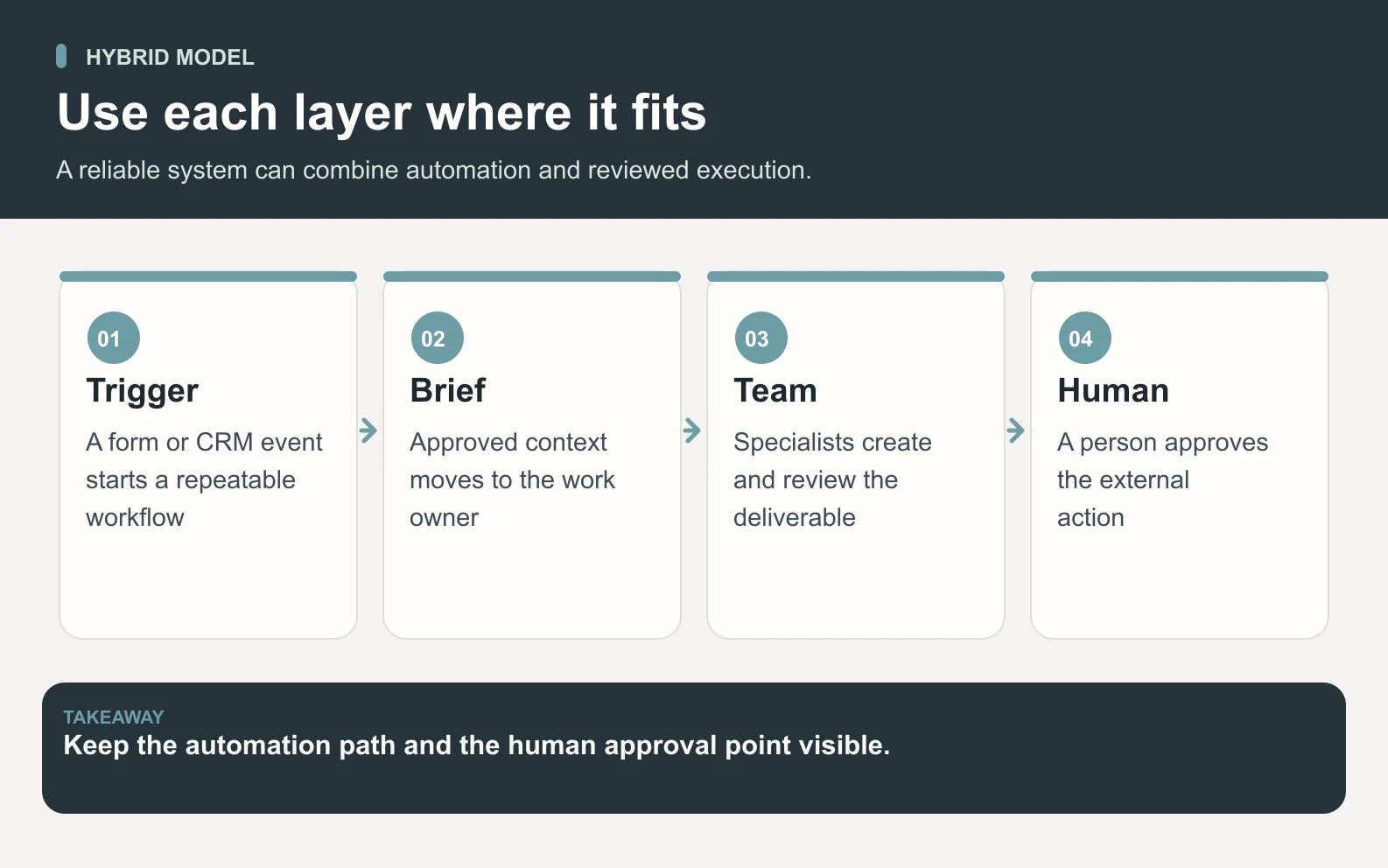
Most startups should not pick a religion. Keep Make/n8n/Zapier (or custom code) for the pipes. Use a managed AI team for the open-ended work that benefits from specialist roles and a project-manager review pass. That split avoids turning every blog post into an engineering ticket—and avoids pretending a chat canvas is a CRM sync.
- 1List work that must be deterministic → automation builder or code.
- 2List work that is open-ended and multi-role → managed team brief.
- 3List work that is core product agent behavior → DIY framework with your own evals.
- 4Assign a human owner for anything that ships externally.
If managed deliverables are the fit, calculate Hydrogen plus specialists on the live pricing page—not a generic “AI employee” estimate.
Open Space Office pricingBottom line
DIY agents optimize for control. Automation builders optimize for reliable pipes. A managed AI team optimizes for coordinated, reviewed output. Pick the path that matches the job—or combine them deliberately—rather than forcing one tool to pretend it is all three.
Sources and review notes
Published by Space Office on September 27, 2026 as an original decision framework. Pricing figures match docs/PRODUCT-FACTS.md and live /pricing. No invented traffic metrics, customer benchmarks, or AggregateRating claims.
- Space Office pricing — checked
- Space Office specialist roster — checked
- Space Office how it works — checked
- n8n pricing — self-hosted and cloud options — checked
- Make pricing — operations and automation credits — checked
- Zapier pricing — task-based automation plans — checked
Frequently asked questions
What is the difference between DIY agents and a managed AI team?
DIY agents mean you design, host, evaluate, and maintain the agent system. A managed AI team means you brief specialists coordinated by a project-manager agent (Hydrogen at Space Office), receive reviewed output, and keep a human approval gate—without owning the orchestration stack day to day.
Should I use automation builders or a managed AI team?
Use automation builders for deterministic app-to-app workflows. Use a managed AI team for open-ended, multi-role deliverables that need review. Many teams should use both.
How much does Space Office cost in this comparison?
Space Office is $60/month or $600/year for Hydrogen plus two specialists. Additional specialists are $25/month or $250/year each. There are 25 live agents total (Hydrogen + 24 specialists). Dedicated AWS compute and bring-your-own model usage are billed separately with zero Space Office markup on AI usage.
When should I build my own agents instead?
Build when agent behavior is part of your product, must run inside a strict data boundary, or is a proprietary workflow you can maintain with engineering capacity. Otherwise prefer buying reviewed output or keeping only the deterministic pipes in a builder.
Where do I go next after this framework?
Open /pricing for live subscription math, /agents for the roster, /how-it-works for the delivery flow, /blog/ai-tool-alternatives for competitor comparisons, and /blog/ai-team-for-businesses for vertical guides.